
Screenshots
App details
- Updated
- 2024-09-12T00:50:30.2171765Z
- Requires
- Windows 10 version 17763.0 or higher
- Language
- English
- Developer
- Dbquity ApS
- Category
- Mobile
SoftPas in:
This product is also available in the following languages:
About In on Dbquity
Download In on Dbquity – collaborative hosting, cloud site management, team collaboration, email-based access, model deployment
Overview
In on Dbquity is a mobile application designed to facilitate collaborative site creation and management within a cloud-based environment. The app enables users to build, host, and oversee their digital sites using preferred cloud storage services, offering a flexible foundation for project-based teamwork. Its core purpose lies in streamlining the process of joint development and content management by allowing users to invite others to participate in shared projects. This makes it particularly useful for remote teams, developers, content creators, and small business owners who require a lightweight yet functional platform for coordinated digital work.
By linking each user account to an email address, In on Dbquity ensures consistent and reliable user identification across collaborations. This system simplifies access control and enhances communication efficiency, especially when multiple contributors are involved. The app supports a range of project types, from personal websites to collaborative documentation hubs, and emphasizes user autonomy through customizable model deployment options. While specific technical details about infrastructure or backend services are not provided, the platform appears to be built around a modular architecture that prioritizes adaptability and user choice.
The app’s emergence in the productivity category reflects a growing demand for lightweight, mobile-first tools that support real-time collaboration without heavy setup. Although the developer did not provide additional information about their background or prior products, the app’s focus on cloud site management and team coordination positions it as a niche utility within the broader ecosystem of digital workspace tools. Its release in September 2024 suggests it is part of a new wave of mobile applications aiming to bring cloud-based collaboration directly to smartphones.
Key Features & Functionality
- Collaborative Hosting: Users can create and host their sites on cloud storage services of their choice, enabling flexible deployment across different environments. This feature supports decentralized workflows and allows teams to maintain control over their data and hosting preferences.
- User Invitation System: The app allows site owners to invite others to join their projects, with access managed through email-based authentication. This ensures that only authorized individuals can contribute, promoting secure and structured collaboration.
- Email-Based Access: Every user account is tied to an email address, which serves as a unique identifier. This system simplifies user recognition and streamlines communication, especially in multi-user environments where clarity and accountability are essential.
- Model Deployment Options: Users can select which models to deploy on their hosted sites, tailoring the functionality of their projects to specific goals. This feature supports customization across various use cases, from data-driven applications to content management systems.
For example, a small marketing team could use In on Dbquity to build a shared campaign site, invite team members via email, and deploy analytics models to track engagement in real time. Similarly, a group of developers might use the app to co-manage a prototype site, choosing deployment models based on performance or scalability needs. The ability to manage these aspects from a mobile device enhances accessibility and responsiveness, particularly for users on the go.
Interface, UX & Performance
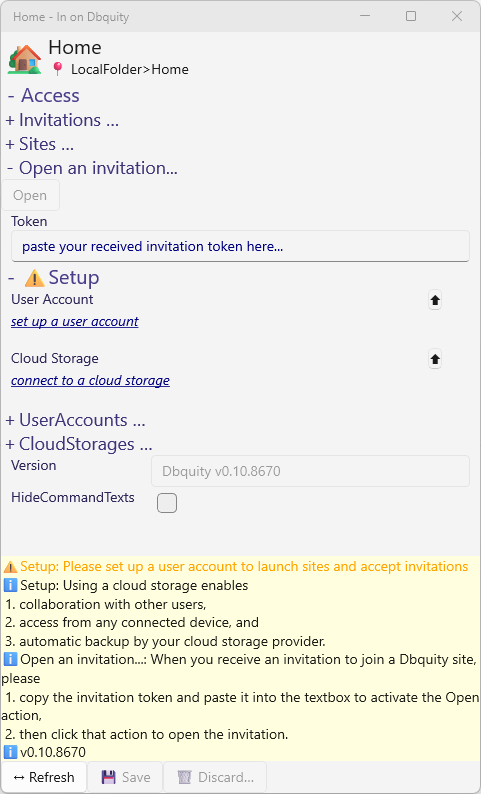
The user interface of In on Dbquity appears to be designed with simplicity and functionality in mind. Navigation is likely structured around core actions such as creating a new site, managing existing projects, and handling invitations. The visual style emphasizes clarity, with intuitive icons and a clean layout that supports quick access to key features. Although the developer did not provide specific details about UI components or design language, the app’s focus on productivity suggests a minimalistic approach to reduce cognitive load.
Interaction flow is expected to follow a logical sequence: account setup via email, site creation, deployment configuration, and invitation management. This streamlined process supports efficient onboarding and reduces the learning curve for new users. The app’s performance on various Android devices is not formally documented, but its lightweight size of 15.2 MB indicates optimized resource usage. This suggests it is designed to run smoothly on mid-range and entry-level smartphones without excessive battery or memory consumption.
Although the developer did not list formal performance metrics, the app’s mobile-first design implies responsiveness across different screen sizes and orientations. Stability during active collaboration sessions would be critical for maintaining trust in the platform, and the absence of reported crashes or errors in initial release notes suggests a solid foundation. Users can expect consistent behavior when managing sites and handling invitations, though real-world testing across diverse devices remains necessary to confirm long-term reliability.
Platform Compatibility & Technical Requirements
In on Dbquity is available exclusively on the Android platform. The app is currently released in version 1.0.0, with a file size of 15.2 MB, indicating a compact and efficient build. This lightweight footprint makes it accessible to users with limited storage space or older devices. The developer did not specify minimum OS requirements, so compatibility with older Android versions cannot be confirmed. However, the app’s release in 2024 suggests it is likely optimized for recent Android releases.
Given that the app is free to download and install, it is accessible to a broad audience without financial barriers. Users can expect a straightforward installation process through official Android channels. While no information was provided about required permissions, the app’s functionality in managing cloud-hosted sites and user invitations may involve access to internet connectivity, email services, and possibly cloud storage APIs. Specific requirements were not listed, so users should review the app’s permissions during installation for transparency.
Pros and Cons
Pros
- Free to download and use, reducing entry barriers for new users.
- Lightweight file size (15.2 MB) ensures compatibility with a wide range of Android devices.
- Email-based user identification enhances security and clarity in team environments.
- Offers customizable model deployment, allowing users to tailor their sites to specific needs.
- Supports collaborative site hosting with built-in invitation system.
Cons
- Platform availability is limited to Android; no iOS version was mentioned.
- Specific technical requirements, such as minimum OS version, were not disclosed.
- Performance on older or low-end devices has not been verified by the developer.
- Limited information about data privacy, encryption, or backend infrastructure.
- No public information about update frequency or long-term development roadmap.
FAQ
Is In on Dbquity available on iOS?
The developer has not announced an iOS version. The app is currently available only on Android.
Can I use In on Dbquity without an internet connection?
While the app may cache some data locally, core features such as site hosting, collaboration, and model deployment require an active internet connection.
How secure is my data on In on Dbquity?
The app uses email-based authentication for user identification. However, specific details about data encryption, storage, or privacy policies were not provided by the developer.
What happens if I forget my email password?
Users should refer to the app’s recovery options or contact the developer directly for assistance. No public password reset mechanism was mentioned.
How often is In on Dbquity updated?
The developer has not disclosed an update schedule. Users should monitor the app store for new versions and security patches.
Final Thoughts
In on Dbquity presents a promising entry into the mobile productivity space, offering a focused solution for collaborative cloud site management. Its combination of email-based access, customizable model deployment, and a built-in invitation system makes it a practical tool for teams seeking a lightweight, mobile-friendly way to co-create and manage digital projects. The app’s free model and compact size further enhance its accessibility, particularly for users who prioritize simplicity and efficiency.
While certain aspects such as platform reach, technical specifications, and long-term support remain unclear, the app’s foundational features are well-aligned with modern collaboration needs. It stands out as a niche utility for developers, content creators, and small teams looking to streamline their digital workflows from a smartphone. With its clean interface and mobile-first design, In on Dbquity delivers tangible value for users who need reliable, on-the-go access to collaborative site management.
Download In on Dbquity now
Guides & Tutorials
How to install In on Dbquity
- Click the Download button above.
- Once redirected, accept the terms and click Install.
- Wait for the In on Dbquity download to finish on your device.
How to use In on Dbquity
This software is primarily used for its core features described above. Open the app after installation to explore its capabilities.
User Reviews
No reviews yet. Be the first to share your experience.
You may also like
more
Que no te pillen¡
About !Que no te pillen¡Reviewed by Jason A. BilbreyShow MoreShow Less

3D Combat Zone
About 3D Combat ZoneOriginally released in 1983, 3D Combat Zone immerses players...

666: El día del portal
About 666: El día del portalOn June 6, 2006, Agent P. Stone uncovers a sinister...

80 in 1 Best Flash games
About 80 in 1 Best Flash games 80 in 1 Best Flash games is a collection of 80 fl...

ABYSS SEEKERーーWhat Do You See Deep in The Abyss
About ABYSS SEEKERーーWhat Do You See Deep in The AbyssIn ABYSS SEEKER, players...

ACA NEOGEO THE KING OF FIGHTERS 2002 for Windows
About ACA NEOGEO THE KING OF FIGHTERS 2002 for WindowsTHE KING OF FIGHTERS 2002,...